HD 1366 에 최적화 된 예제입니다.
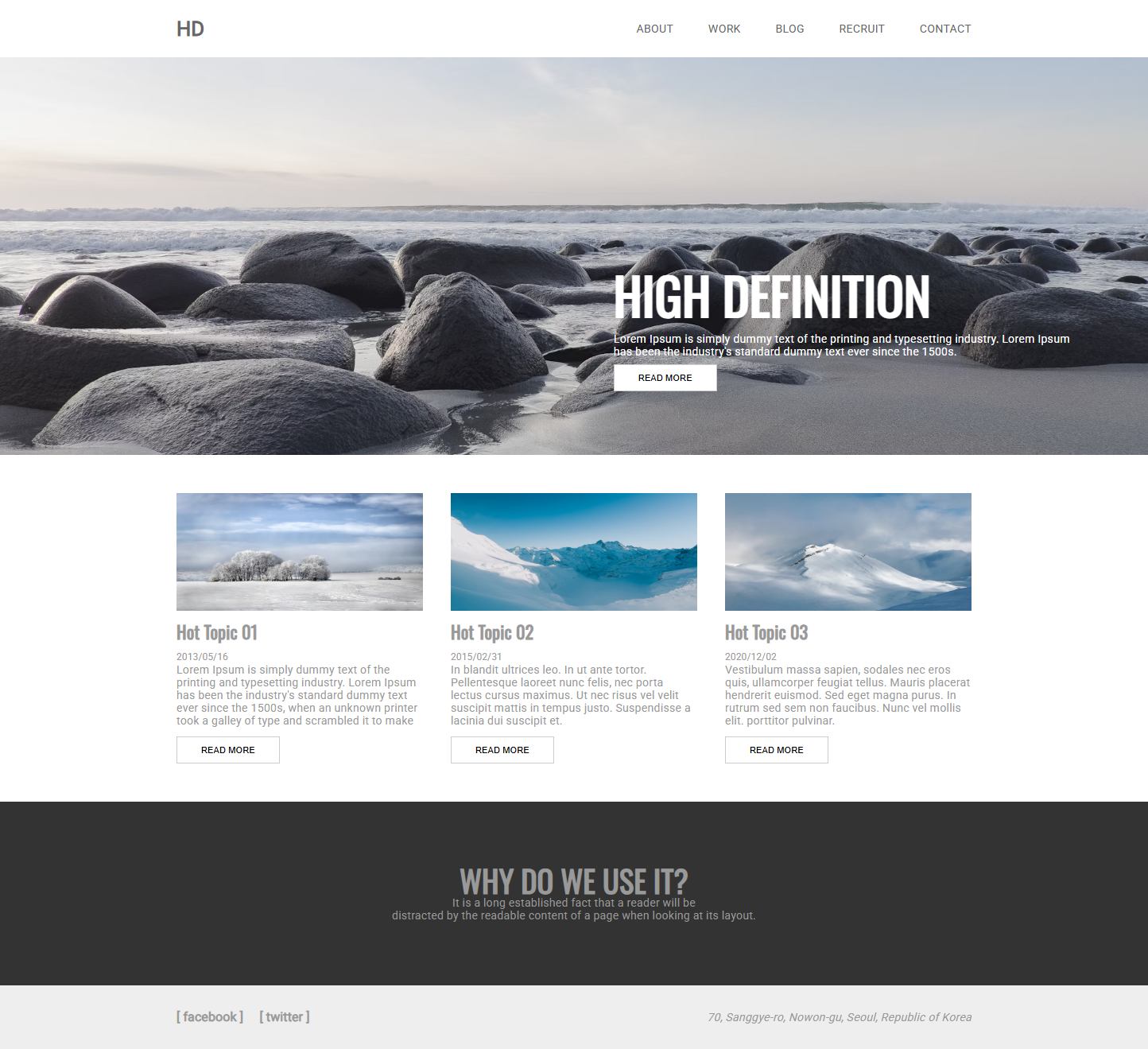
https://codepen.io/lshjju/pen/jOwoGBK
coding
다운로드 디렉토리에
hd 디렉토리 만들기
브이에스 코드 가서
hd 디렉토리 오픈
index.html
style.css
파일 만들기
기본코드 세팅
<!doctype html>
<html lang="en">
<head>
<meta charset="UTF-8">
<meta name="viewport" content="width=device-width, initial-scale=1, maximum-scale=3.0">
<title>jinuk---</title>
<link rel="stylesheet" href="style.css">
</head>
<body>
<header>
<div>
<a href="#" onclick="return false;">hd</a>
</div>
<nav>
<ul>
<li><a href="#" onclick="return false;">About</a></li>
<li><a href="#" onclick="return false;">Work</a></li>
<li><a href="#" onclick="return false;">Blog</a></li>
<li><a href="#" onclick="return false;">Recruit</a></li>
<li><a href="#" onclick="return false;">Contact</a></li>
</ul>
</nav>
</header>
<main>
<div>
<h1>High definition</h1>
<p>Lorem Ipsum is simply dummy text of the printing and typesetting industry. Lorem Ipsum has been the industry's
standard dummy text ever since the 1500s.</p>
<button>Read more</button>
</div>
</main>
<article class="topic">
<section>
<img
src="https://images.unsplash.com/photo-1551369277-a930560141bb?ixlib=rb-1.2.1&ixid=eyJhcHBfaWQiOjEyMDd9&auto=format&fit=crop&w=1552&q=80">
<h3>Hot Topic 01</h3>
<small>2013/05/16</small>
<p>Lorem Ipsum is simply dummy text of the printing and typesetting industry. Lorem Ipsum has been the industry's
standard dummy text ever since the 1500s, when an unknown printer took a galley of type and scrambled it to make
</p>
<button>Read more</button>
</section>
<section>
<img
src="https://images.unsplash.com/photo-1550856015-de3a3956c67d?ixlib=rb-1.2.1&ixid=eyJhcHBfaWQiOjEyMDd9&auto=format&fit=crop&w=1500&q=80">
<h3>Hot Topic 02</h3>
<small>2015/02/31</small>
<p>In blandit ultrices leo. In ut ante tortor. Pellentesque laoreet nunc felis, nec porta lectus cursus maximus.
Ut nec risus vel velit suscipit mattis in tempus justo. Suspendisse a lacinia dui suscipit et.</p>
<button>Read more</button>
</section>
<section>
<img
src="https://images.unsplash.com/photo-1550668180-3205f7bb6a9e?ixlib=rb-1.2.1&ixid=eyJhcHBfaWQiOjEyMDd9&auto=format&fit=crop&w=1500&q=80">
<h3>Hot Topic 03</h3>
<small>2020/12/02</small>
<p>Vestibulum massa sapien, sodales nec eros quis, ullamcorper feugiat tellus. Mauris placerat hendrerit euismod.
Sed eget magna purus. In rutrum sed sem non faucibus. Nunc vel mollis elit. porttitor pulvinar. </p>
<button>Read more</button>
</section>
</article>
<article class="why">
<h2>Why do we use it?</h2>
<p>
It is a long established fact that a reader will be <br>distracted by the readable content of a page when looking
at its layout.</p>
</article>
<footer>
<div>
<div>
[ facebook ] [ twitter ]
</div>
<address>
70, Sanggye-ro, Nowon-gu, Seoul, Republic of Korea
</address>
</div>
</footer>
</body>
</html>
c
@charset "utf-8"; /* 문자 인코딩을 UTF-8로 설정 (다국어 지원) */

@import url('https://fonts.googleapis.com/css?family=Roboto&display=swap'); /* Google Fonts에서 Roboto 폰트 불러오기 */
@import url('https://fonts.googleapis.com/css?family=Oswald&display=swap'); /* Google Fonts에서 Oswald 폰트 불러오기 */
@import url('https://fonts.googleapis.com/css?family=Playfair+Display&display=swap'); /* Google Fonts에서 Playfair Display 폰트 불러오기 */

/* 모든 요소에 적용되는 기본 스타일 초기화 */
* {
  margin: 0; /* 모든 요소의 바깥 여백을 0으로 설정 */
  padding: 0; /* 모든 요소의 안쪽 여백을 0으로 설정 */
  list-style: none; /* 목록의 스타일(점, 숫자)을 없앰 */
  box-sizing: border-box; /* box-sizing을 border-box로 설정하여 padding과 border가 요소의 크기에 포함되도록 함 */
  word-break: keep-all; /* 단어 단위로 줄바꿈 (긴 단어가 영역을 넘어가지 않도록) */
  overflow-wrap: break-word; /* 긴 단어가 영역을 넘어갈 경우 줄바꿈 */
  outline: 0px solid silver; /* outline을 없앰 */
}

/* body 요소에 적용되는 스타일 */
body {
  font-family: 'Roboto', sans-serif; /* 폰트 패밀리를 Roboto로 설정 */
  font-size: 0.9rem; /* 폰트 크기를 0.9rem으로 설정 */
  line-height: 1rem; /* 줄 간격을 1rem으로 설정 */
  color: #999; /* 글자 색상을 #999로 설정 */
  letter-spacing: 0.1px; /* 글자 간 간격을 0.1px로 설정 */
}

/* h1, h2, h3 요소에 적용되는 스타일 */
h1,
h2,
h3 {
  font-family: 'Oswald', sans-serif; /* 폰트 패밀리를 Oswald로 설정 */
}

h1 {
  font-size: 4rem; /* 폰트 크기를 4rem으로 설정 */
  line-height: 4rem; /* 줄 간격을 4rem으로 설정 */
  text-transform: uppercase; /* 텍스트를 모두 대문자로 변환 */
}

h2 {
  font-size: 2.4rem; /* 폰트 크기를 2.4rem으로 설정 */
  line-height: 2.4rem; /* 줄 간격을 2.4rem으로 설정 */
  text-transform: uppercase; /* 텍스트를 모두 대문자로 변환 */
}

h3 {
  font-size: 1.4rem; /* 폰트 크기를 1.4rem으로 설정 */
  line-height: 1.4rem; /* 줄 간격을 1.4rem으로 설정 */
}

/* h4, h5 요소에 적용되는 스타일 */
h4,
h5 {
  font-family: 'Playfair Display', serif; /* 폰트 패밀리를 Playfair Display로 설정 */
}

h4 {
  font-size: 1.1rem; /* 폰트 크기를 1.1rem으로 설정 */
  line-height: 1.1rem; /* 줄 간격을 1.1rem으로 설정 */
}

h5 {
  font-size: 0.7rem; /* 폰트 크기를 0.7rem으로 설정 */
  line-height: 0.7rem; /* 줄 간격을 0.7rem으로 설정 */
}

/* a 태그(링크)에 적용되는 스타일 */
a:link {
  color: #666; /* 방문하지 않은 링크의 색상을 #666으로 설정 */
  text-decoration: none; /* 텍스트 밑줄 없앰 */
}

a:visited {
  color: #666; /* 방문한 링크의 색상을 #666으로 설정 */
}

a:hover {
  color: red; /* 마우스 호버 시 링크 색상을 red로 변경 */
}

a:active {
  color: red; /* 클릭 시 링크 색상을 red로 변경 */
}

/* button 요소에 적용되는 스타일 */
button {
  font-size: 0.7rem; /* 폰트 크기를 0.7rem으로 설정 */
  text-transform: uppercase; /* 텍스트를 대문자로 변환 */
  padding: 10px 30px; /* 안쪽 여백을 상하 10px, 좌우 30px로 설정 */
  border: 1px solid #ccc; /* 테두리를 1px solid #ccc로 설정 */
  background: white; /* 배경색을 흰색으로 설정 */
  transition: 0.3s; /* hover 효과를 부드럽게 만들기 위해 transition 설정 */
}

button:hover {
  background: crimson; /* 마우스 호버 시 배경색을 crimson으로 변경 */
  color: white; /* 마우스 호버 시 글자 색상을 white로 변경 */
  cursor: pointer; /* 마우스 호버 시 커서를 포인터로 변경 */
}

/* img 요소에 적용되는 스타일 */
img {
  width: 100px; /* 이미지 너비를 100px로 설정 */
}

/* start */

/* header 요소에 적용되는 스타일 */
header {
  width: 1000px; /* 너비를 1000px로 설정 */
  margin: 0 auto; /* 가로로 중앙 정렬 */
  padding: 16px 0; /* 위아래 padding을 16px로 설정 */
  display: flex; /* flexbox 레이아웃 사용 */
  justify-content: space-between; /* 요소들을 양 끝으로 정렬하고 남은 공간을 균등하게 분배 */
}

/* header 내부 div 요소에 적용되는 스타일 */
header div {
  font-size: 1.6rem; /* 폰트 크기를 1.6rem으로 설정 */
  font-weight: bold; /* 폰트를 굵게 설정 */
  text-transform: uppercase; /* 텍스트를 대문자로 변환 */
  line-height: 2.5rem; /* 줄 간격을 2.5rem으로 설정 */
}

/* header nav ul li 요소에 적용되는 스타일 */
header nav ul li {
  display: inline-block; /* 가로로 나열 */
  text-transform: uppercase; /* 텍스트를 대문자로 변환 */
  padding: 0 0 0 40px; /* 왼쪽 padding을 40px로 설정 */
  line-height: 2.5rem; /* 줄 간격을 2.5rem으로 설정 */
}

/* main 요소에 적용되는 스타일 */
main {
  position: relative; /* 상대 위치 설정 */
  height: 500px; /* 높이를 500px로 설정 */
  background: url('https://images.unsplash.com/photo-1510674288907-1b60ac093e87?ixlib=rb-1.2.1&ixid=eyJhcHBfaWQiOjEyMDd9&auto=format&fit=crop&w=1950&q=80') no-repeat; /* 배경 이미지 설정 및 반복 방지 */
  background-size: cover; /* 배경 이미지를 요소에 꽉 차게 확대/축소 */
  background-position: center center; /* 배경 이미지 위치를 중앙으로 설정 */
}

/* main 내부 div 요소에 적용되는 스타일 */
main div {
  position: absolute; /* 절대 위치 설정 */
  width: 600px; /* 너비를 600px로 설정 */
  color: white; /* 글자 색상을 흰색으로 설정 */
  right: 5%; /* 오른쪽 여백을 5%로 설정 */
  bottom: 80px; /* 아래 여백을 80px로 설정 */
}

/* main 내부 div 요소의 모든 자식 요소에 적용되는 스타일 */
main div * {
  padding: 8px 0; /* 위아래 padding을 8px로 설정 */
}

/* main 내부 div 요소의 button 요소에 적용되는 스타일 */
main div button {
  padding: 10px 30px; /* 안쪽 여백을 상하 10px, 좌우 30px로 설정 */
}

/* .topic 요소에 적용되는 스타일 */
.topic {
  width: 1000px; /* 너비를 1000px로 설정 */
  margin: 0 auto; /* 가로로 중앙 정렬 */
  padding: 48px 0; /* 위아래 padding을 48px로 설정 */
  display: flex; /* flexbox 레이아웃 사용 */
  justify-content: space-between; /* 요소들을 양 끝으로 정렬하고 남은 공간을 균등하게 분배 */
}

/* .topic 내부 section 요소에 적용되는 스타일 */
.topic section {
  width: 310px; /* 너비를 310px로 설정 */
}

/* .topic 내부 section 요소의 img 요소에 적용되는 스타일 */
.topic section img {
  width: 310px; /* 너비를 310px로 설정 */
  height: 160px; /* 높이를 160px로 설정 */
}

/* .topic 내부 section 요소의 모든 자식 요소에 적용되는 스타일 */
.topic section * {
  padding: 0 0 12px; /* 아래 padding을 12px로 설정 */
}

/* .topic 내부 section 요소의 button 요소에 적용되는 스타일 */
.topic section button {
  padding: 10px 30px; /* 안쪽 여백을 상하 10px, 좌우 30px로 설정 */
}

/* .why 요소에 적용되는 스타일 */
.why {
  background: #333; /* 배경색을 #333으로 설정 */
  padding: 80px 0; /* 위아래 padding을 80px로 설정 */
  text-align: center; /* 텍스트를 가운데 정렬 */
}

/* footer 요소에 적용되는 스타일 */
footer {
  background: #eee; /* 배경색을 #eee로 설정 */
  padding: 32px 0; /* 위아래 padding을 32px로 설정 */
}

/* footer 내부 div 요소에 적용되는 스타일 */
footer>div {
  width: 1000px; /* 너비를 1000px로 설정 */
  margin: 0 auto; /* 가로로 중앙 정렬 */
  display: flex; /* flexbox 레이아웃 사용 */
  justify-content: space-between; /* 요소들을 양 끝으로 정렬하고 남은 공간을 균등하게 분배 */
}

/* footer 내부 div 요소의 첫 번째 자식 요소에 적용되는 스타일 */
footer div :first-child {
  font-size: 1rem; /* 폰트 크기를 1rem으로 설정 */
  font-weight: bold; /* 폰트를 굵게 설정 */
}
end

'UI Design project' 카테고리의 다른 글
| 적응형 반응형 웹 사이트 코딩 실무 예제 - RWD AND AWD (0) | 2025.06.14 |
|---|---|
| 반응형 웹 사이트 코딩 실무 예제 - RWD (0) | 2025.06.14 |
| 유저의 움직임에 반응하는 웹사이트 실무 코딩 예제 - Active and fixed (1) | 2025.06.14 |
| 브라우저 넓이에 반응하는 웹사이트 실무 코딩 예제 - Flexible and fixed (1) | 2025.06.14 |